
🔥 OBD2 Scanner Black Friday Deals for 2026: picks worth watching →
Picture this: you are driving home after a long day, and out of nowhere, a car swerves into your lane. Your heart races as you brake hard, but the other driver claims it was your fault. Without a dash cam, it is your word against theirs. That is why investing in the best Garmin dash cam is a smart move for any driver who wants peace of mind and clear evidence on the road. In this guide, we break down the top Garmin models available in 2026, from the tiny Mini 3 to the feature-packed X310, so you can find the perfect fit for your vehicle and budget.
We have evaluated each camera based on video quality, field of view, voice control, and extra features like GPS and live view. Whether you are a daily commuter or a road trip enthusiast, this review will help you make an informed choice. For more top picks in vehicle safety gear, check out our best dash cam guide for 2026.


Buying Guide
Video Resolution and Clarity
The most important feature of any dash cam is how clearly it captures details like license plates and road signs. Garmin offers models from 1080p HD all the way up to 4K Ultra HD. For basic peace of mind, a 1080p camera like the Mini 3 or X110 works well. If you want sharper footage for night driving or identifying small details, step up to the 1440p X210 or the 4K X310. Higher resolution also helps when you need to zoom in on footage later.
Remember that higher resolution files take up more space on your memory card, so consider a camera with loop recording or cloud backup. For a broader look at dash cam features, visit our reviews section.
Field of View and Lens Quality
A wider field of view captures more of the road, including side lanes and intersections. Most Garmin cameras offer a 140-degree field of view, which is standard for good coverage. The Garmin Dash Cam 67W stands out with an extra-wide 180-degree lens, ideal for catching action from the sides. Some models also include a built-in Clarity polarizer to reduce glare and improve image quality in bright sunlight.
Choose a wider lens if you park on busy streets or drive in heavy traffic. A narrower lens may be sufficient for highway driving. For more comparisons, see our comparisons page.
Voice Control and Smart Features
Hands-free operation is a huge safety plus while driving. Most newer Garmin dash cams support voice commands, letting you save clips, start or stop recording, or take a photo without touching the device. This is especially useful if you need to capture something quickly without taking your eyes off the road. Some models also include automatic accident notification, which can alert emergency services if a collision is detected.
For drivers who want constant monitoring, the Garmin Dash Cam Live offers 24/7 live view through a cellular connection, so you can check your vehicle from anywhere. This is a premium feature for those who park in unsecured areas or travel frequently.
Design and Mounting Options
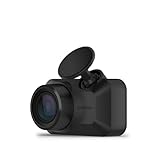
Size matters when it comes to dash cams. The Garmin Dash Cam Mini 3 is ultracompact and key-sized, making it nearly invisible behind your rearview mirror. Larger models like the X310 have a 2.4-inch touchscreen display, which makes it easier to review footage or adjust settings on the go. Consider where you will mount the camera and whether you prefer a discreet design or a screen for easy interaction.
All Garmin cameras come with adhesive mounts that stick firmly to your windshield. Some models also include a magnetic mount for quick removal. For more tips on setting up your car tech, explore our best products category.
Final Thoughts
Choosing the best Garmin dash cam depends on your priorities: go with the Garmin Dash Cam™ Mini 3, Ultracompact 1080p HD for a stealthy, affordable option that still delivers reliable 1080p video and voice control, or upgrade to the Garmin Dash Cam™ X310, Compact 4k Ultra HD Dash for stunning 4K clarity and a touchscreen interface that makes reviewing footage a breeze. Both models offer the quality and dependability you expect from Garmin, so you can drive with confidence knowing your journeys are recorded.
Frequently Asked Questions
Do Garmin dash cams work without a subscription? Yes, all Garmin dash cams record locally to a memory card and do not require a subscription for basic recording. The Garmin Dash Cam Live requires a data plan for live view and cloud features, but standard models work fully offline.
Can I use a Garmin dash cam in extreme temperatures? Garmin dash cams are designed to operate in a wide temperature range, typically from -4°F to 140°F. For very hot climates, consider parking in the shade or using a sunshade to protect the camera.
How do I install a Garmin dash cam? Installation is simple: clean your windshield, attach the adhesive mount, plug the camera into your car’s 12V outlet or hardwire it, and adjust the angle. Most models include a quick-start guide. For detailed steps, check our information section.
What memory card do I need for a Garmin dash cam? Garmin recommends a high-endurance microSD card with at least 64GB capacity for reliable recording. Class 10 or UHS-I cards are best for handling continuous write cycles. The camera will format the card automatically on first use.