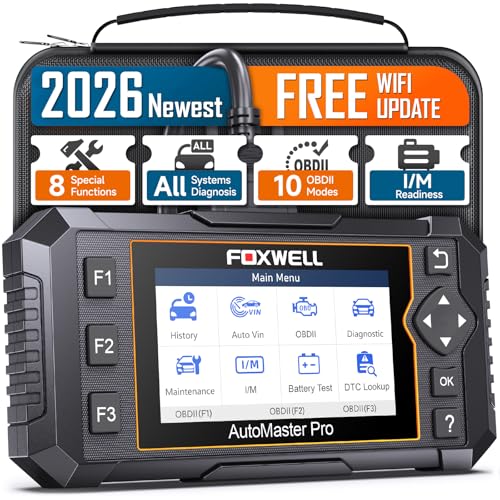

🔥 OBD2 Scanner Black Friday Deals for 2026: picks worth watching →
You are staring at a check engine light, and the usual DIY fixes are not working. You need a diagnostic tool that goes beyond basic code reading, but you do not want to spend a fortune on a professional-grade scanner. This is where the Thinkcar Thinkscan 662 OBD2 scanner enters the picture. It promises bidirectional control, multiple reset functions, and full system diagnostics at a price that fits a home mechanic’s budget. In this Thinkcar Thinkscan 662 OBD2 scanner review, we will break down its features, compare it with other models, and help you decide if it is the right tool for your garage in 2026. We have evaluated nine Thinkcar scanners to give you a complete picture, from entry-level options to advanced AI-powered units. For a broader look at OBD2 scanners, check out our FOXWELL NT624 elite review for another popular option.


Buying Guide: What to Look for in an OBD2 Scanner
Bidirectional Control Capability
Bidirectional control, also called active test, is the feature that separates a basic code reader from a true diagnostic tool. It allows you to send commands from the scanner to your vehicle’s components, such as turning on the fuel pump, cycling the radiator fan, or activating the ABS solenoids. This capability helps you verify whether a part is actually faulty before you replace it, saving time and money. The Thinkcar Thinkscan 662 offers this feature, which is rare at its price point. For a comparison of bidirectional scanners, see our TOPDON vs innova.
System Coverage and Reset Functions
A good OBD2 scanner should do more than read engine codes. Look for a model that can access multiple vehicle systems, including ABS, SRS, transmission, and body control modules. Reset functions are equally important for routine maintenance tasks like oil light resets, brake pad replacements, and battery registration. The Thinkscan 662 covers four core systems and includes 12 reset services, making it suitable for DIYers who handle their own maintenance. For a deeper dive into system coverage, read our autel vs xtool.
Ease of Use and Software Updates
No one wants to spend hours learning how to operate a diagnostic tool. A user-friendly interface with a touchscreen, clear menus, and intuitive navigation is essential. Lifetime free software updates are also a critical factor, as they ensure your scanner stays compatible with newer vehicle models and receives bug fixes. The Thinkscan 662 runs on Android 8 with a 6.2-inch touchscreen and offers lifetime free updates via Wi-Fi. For another easy-to-use option, check out the ANCEL BA101 review.
Vehicle Compatibility and Protocols
Before buying any scanner, verify that it supports your vehicle’s make, model, and year. Look for support for modern protocols like CAN FD and DoIP, which are used on newer vehicles from many manufacturers. The Thinkscan 662 supports CAN FD and FCA AutoAuth for Chrysler, Dodge, Jeep, and Ram vehicles from 2018 onward. It covers over 140 brands and 10,000 models, but compatibility varies, so always check with the manufacturer before ordering. For a broader look at protocol support, see our FOXWELL NT630 plus OBD2 review.
Final Thoughts
After evaluating nine Thinkcar scanners, the Thinkcar Thinkscan 662 stands out as a strong value pick for DIY enthusiasts and small repair shops who need bidirectional control and multiple reset functions without breaking the bank. Its 4-system diagnostics, 12 resets, and lifetime free updates make it a practical choice for routine maintenance and troubleshooting. If you need more advanced features like ECU coding or AI-assisted diagnostics, consider stepping up to the THINKCAR ThinkScan 689 OBD2 Scanner or the THINKCAR AI+Bidirectional Scan Tool THINKSCAN, which offer 34+ resets and full bidirectional control for professional use. Whichever model you choose, Thinkcar’s lineup provides reliable diagnostics for every skill level.
Frequently Asked Questions
Does the Thinkcar Thinkscan 662 work on all cars?
The Thinkscan 662 works on OBDII-compliant vehicles from 1996 onward, covering over 140 brands and 10,000 models. It supports CAN FD and FCA AutoAuth for newer Chrysler, Dodge, Jeep, and Ram vehicles. However, compatibility varies by make and model, so it is best to check with Thinkcar before purchasing.
Can the Thinkscan 662 perform bidirectional control?
Yes, the Thinkscan 662 includes bidirectional control, also known as active test. This allows you to command components like fuel injectors, cooling fans, and ABS pumps to verify their operation, helping you pinpoint faults faster. For more on bidirectional tools, see our ANCEL vs FOXWELL.
Does the Thinkcar Thinkscan 662 require a subscription?
No, the Thinkscan 662 does not require a subscription. It comes with lifetime free software updates via Wi-Fi, so you can keep the scanner current without paying annual fees. This is a major advantage over many competing models that charge for updates.
What reset functions does the Thinkscan 662 have?
The Thinkscan 662 includes 12 reset functions, such as Oil Reset, EPB, ABS Bleeding, SAS Calibration, Throttle Adaptation, BMS Battery Registration, DPF Regeneration, TPMS Reset, Injector Coding, Gearbox Learning, and IMMO. These cover most common maintenance tasks for DIYers and small shops.