
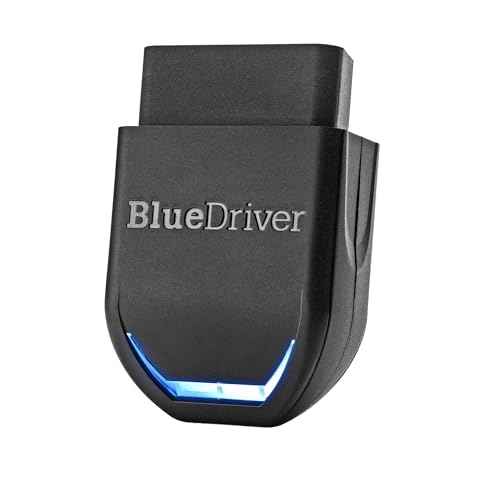
Your check engine light just blinked on, and you have no idea what’s wrong. You could drive to a shop and pay for a diagnostic, but that costs time and money. Or you could take control and find out yourself with a reliable OBD2 scanner. That’s where the BlueDriver Bluetooth Pro comes in. This review will help you understand what makes this tool a favorite among car owners and mechanics alike, and we’ll also look at some useful accessories to keep it safe.
We’ve spent time evaluating the BlueDriver line, and we’re here to share our insights. Whether you’re a weekend DIYer or a professional technician, this guide will help you decide if the BlueDriver is the right diagnostic tool for your garage. For a broader look at top diagnostic tools, check out our best car diagnostic tool code reader scanner guide.


Buying Guide: What to Look for in an OBD2 Scanner
Diagnostic Capabilities: Beyond Basic Code Reading
Not all OBD2 scanners are created equal. Basic code readers can pull engine trouble codes, but a professional-grade scanner like the BlueDriver goes further. It can read and clear codes for ABS, SRS (airbags), TPMS, and transmission, giving you a fuller picture of your vehicle’s health. This is crucial for diagnosing issues that don’t trigger the check engine light.
When you’re shopping, consider what systems you need to diagnose. If you drive an older car, a basic scanner might suffice. But for modern vehicles with complex electronics, enhanced diagnostics are a must. The BlueDriver Pro, for example, also provides live data, freeze frame data, and Mode 6 test results, which are essential for advanced troubleshooting. For more on what to look for, see our guide on best OBD2 scanners for Ram 2500.
Wireless Connectivity and App Experience
A good OBD2 scanner should be easy to use. Wireless Bluetooth connectivity is a game-changer, letting you turn your smartphone or tablet into a powerful diagnostic display. The BlueDriver app is free and regularly updated, with a user-friendly interface that explains codes in plain English. Look for a scanner that offers a robust app with features like repair reports and live data graphing.
Compatibility with both iOS and Android is also important. You don’t want to be locked into one platform. The BlueDriver works with both, and the app is intuitive enough for beginners yet deep enough for pros. If you’re considering other brands, our autel US review offers a comparison point.
Vehicle Coverage and Future-Proofing
Before you buy, check the scanner’s compatibility with your vehicle. Most OBD2 scanners work with cars from 1996 onward, but coverage can vary by make and model. The BlueDriver has broad coverage for North American gas vehicles, and the newer model even supports select light-duty trucks and diesels. If you own a European or Asian car, make sure the scanner you choose has strong support for those brands.
Consider how long you plan to keep your vehicle. A scanner that gets regular app updates and expands its coverage is a better long-term investment. For example, the BlueDriver Pro Next Gen has enhanced communication on select 2024+ Nissan and Mazda models, which shows a commitment to staying current. If you drive a Toyota, you might also want to check our best OBD2 scanners for Toyota guide.
No Subscription Fees and Value
Some diagnostic tools require a subscription to access advanced features, which can add up over time. The BlueDriver stands out because it has no subscription fees, ever. You pay once and get full access to all features, including repair reports and live data. This makes it a cost-effective choice for DIYers who want professional-grade diagnostics without a recurring cost.
Also, consider the build quality and warranty. A durable scanner with a good warranty gives you peace of mind. The BlueDriver is well-built and backed by a reputable brand. For a deep dive into another popular scanner, our TOPDON ONE review might be helpful.
Final Thoughts
After evaluating the BlueDriver line, we’re confident that the BlueDriver OBD2 Scanner Bluetooth is an excellent choice for most car owners, offering professional-grade diagnostics without a subscription. If you’re looking for the newest model with expanded vehicle coverage, the BlueDriver OBD2 Scanner Bluetooth is a great pick. Both are backed by a solid app and strong support, making them a smart investment for anyone who wants to understand their vehicle better.
Frequently Asked Questions
Is the BlueDriver Bluetooth Pro worth it in 2026?
Yes, the BlueDriver Bluetooth Pro remains a top contender in 2026. It offers professional-level diagnostics at a fraction of the cost of a dealer scan tool, and with no subscription fees, it’s a one-time investment that pays for itself over time.
Can I use the BlueDriver scanner with my Android or iPhone?
Absolutely. The BlueDriver works with both iOS and Android devices via Bluetooth. The free app is well-designed and regularly updated, ensuring a smooth experience on both platforms.
Does the BlueDriver scanner work with any car?
The BlueDriver is designed for all gas-powered vehicles made in 1996 or newer sold in North America. It also supports select light-duty trucks and diesels. For specific compatibility, check the manufacturer’s website or the app’s compatibility chart.
What is the difference between the BlueDriver Pro and Pro Next Gen?
The Pro Next Gen model offers expanded vehicle coverage, including enhanced communication on select 2024+ Nissan and Mazda models, and it also supports more light-duty trucks and diesels. If you have a newer vehicle, the Next Gen might be a better fit. For a more detailed comparison, you can read our BlueDriver pro scan tool review.