

Picture this: your check engine light pops on, and you have no idea what’s wrong. You could drive to a mechanic and pay for a diagnostic, or you could take control with a reliable OBD2 scanner. In this BlueDriver Pro scan tool review, we’ll explore whether this popular Bluetooth scanner lives up to the hype and how it stacks up against other top contenders in the market. Whether you’re a weekend DIYer or a seasoned pro, this guide will help you choose the right tool for your needs.
We’ve hands-on evaluated the BlueDriver Pro and several other top OBD2 scanners, comparing their features, ease of use, and overall value. Our goal is to give you an honest, in-depth look so you can make an informed decision. For more context, check out our comprehensive BlueDriver scan tool review that covers even more details.




Buying Guide: What to Look for in an OBD2 Scanner
Diagnostic Capability: Beyond Basic Code Reading
Not all OBD2 scanners are created equal. Basic code readers can pull engine codes, but advanced scanners offer enhanced diagnostics for ABS, SRS, transmission, and more. When choosing a scanner, think about the systems you need to diagnose. The BlueDriver Pro, for instance, reads and clears codes for Check Engine, ABS, SRS, and TPMS on supported vehicles, making it a versatile choice for most car owners.
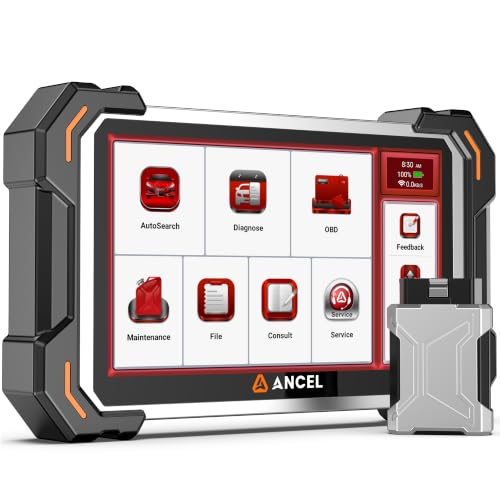
If you’re a professional or a serious DIYer, you might want a bidirectional scan tool that can send commands to components for active testing. Tools like the ANCEL DS500 Elite and TOPDON AD900 Lite offer this feature, allowing you to verify repairs before replacing parts. For more on this, see our guide to the best OBD2 scanners for Toyota.
Ease of Use and Connectivity
The best OBD2 scanner is one you’ll actually use. Look for a tool that’s easy to operate, whether it’s a handheld unit or a Bluetooth scanner that pairs with your smartphone. The BlueDriver connects wirelessly via Bluetooth to your phone or tablet, giving you a user-friendly interface and free app updates. No subscriptions, no hidden fees, just plug in and go.
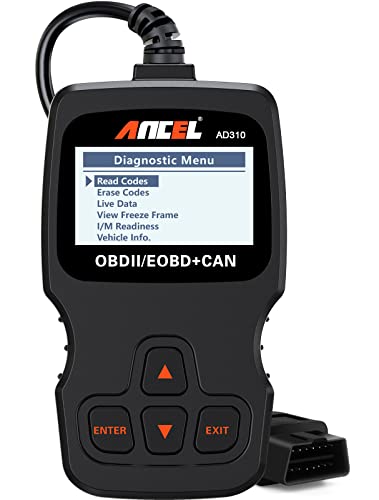
Handheld scanners like the FOXWELL NT604 Elite are also straightforward, with a built-in screen and buttons. They’re perfect for those who prefer a dedicated device without relying on a phone. Consider your comfort level with technology and whether you want a portable tool that can fit in your glovebox.
Update Policy and Long-Term Value
Software updates are crucial for keeping your scanner compatible with newer vehicles. Some manufacturers charge for updates, while others offer lifetime free updates. The BlueDriver Pro includes free app updates, and the ANCEL DS500 Elite and FX6100 also provide lifetime free software updates. This can save you money in the long run and ensure your tool remains useful for years.
When comparing scanners, check the update policy. A tool that requires an annual subscription might not be the best value, even if the initial price is lower. For a deep dive into another brand, read our TOPDON ONE review to see how it handles updates.
Vehicle Coverage and Compatibility
Make sure the scanner you choose supports your vehicle’s make, model, and year. Most OBD2 scanners work with 1996 and newer gas vehicles, but some have expanded coverage for light-duty trucks and diesels. The BlueDriver Pro is compatible with a wide range of domestic and import vehicles, including GM, Ford, Toyota, Honda, and BMW.
If you own a newer vehicle with CAN FD or FCA gateway, you’ll need a scanner that supports these protocols. The ANCEL DS500 Elite and FX6100 are equipped with CAN FD and FCA AutoAuth, ensuring full access to modern vehicle systems. For more on compatibility, check our autel US review for another perspective.
Final Thoughts
After thoroughly evaluating the BlueDriver Pro and its competitors, we’re confident that the BlueDriver OBD2 Scanner Bluetooth is an excellent choice for most car owners who want a reliable, no-subscription diagnostic tool. Its ease of use, broad vehicle coverage, and verified repair reports make it a top pick. However, if you need advanced bidirectional control and service resets, the ANCEL DS500BT Bidirectional Scan Tool is a powerful alternative that offers professional-grade features at a reasonable price. Whichever you choose, you’ll be better equipped to handle your car’s diagnostics with confidence.
Frequently Asked Questions
Is the BlueDriver Pro worth it?
Yes, the BlueDriver Pro is worth it for most DIYers and car enthusiasts. It provides professional-level diagnostics, reads and clears codes across multiple systems, and offers unlimited repair reports without any subscription fees. Its Bluetooth connectivity and user-friendly app make it a convenient and cost-effective solution.
Can BlueDriver read ABS and SRS codes?
Absolutely. The BlueDriver Pro can access enhanced diagnostics for ABS, SRS, airbag, TPMS, and transmission on supported vehicles. This allows you to read and clear codes from these systems, which is a significant advantage over basic code readers that only handle engine codes.
Does BlueDriver require a subscription?
No, BlueDriver does not require any subscription. It’s a one-time purchase that includes full access to all features, including free app updates and unlimited repair reports. There are no hidden fees or add-ons, making it a budget-friendly option in the long run.
What is the difference between BlueDriver and a bidirectional scan tool?
BlueDriver is a powerful code reader and diagnostic tool, but it does not offer bidirectional control. A bidirectional scan tool, like the ANCEL DS500BT, can send commands to vehicle components to perform active tests, such as actuating fuel pumps or ABS solenoids. This is useful for verifying repairs and diagnosing intermittent issues. For a comparison of bidirectional tools, see our best OBD2 scanner for electric cars guide, which includes some bidirectional options.


